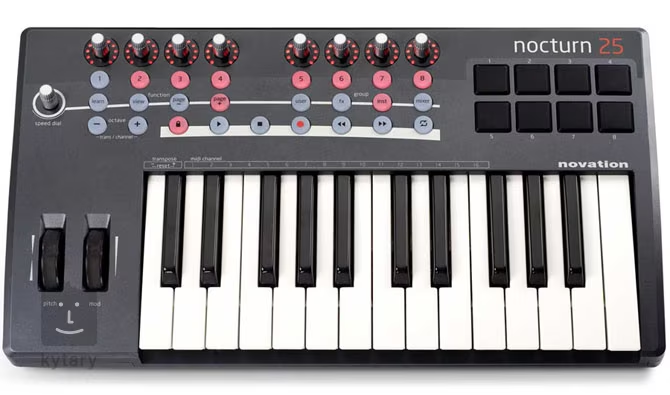
• 8 Encoders (Infinite Rotation) with touch-sensitivity and 11 segment Led rings
• Touch sensitive Speed Dial
• 14 Buttons with integrated LEDs, 6 of which are lockable transport controls
• 8 soft feel Trigger pads
• Sprung pitch wheel
• Modulation wheel
System buttons:
• General Automap Operation Buttons (Learn, View, Browser Groups etc.)
• Octave up/down buttons with LED indicator
• Button to lock/unlock transport controls
Connectivity
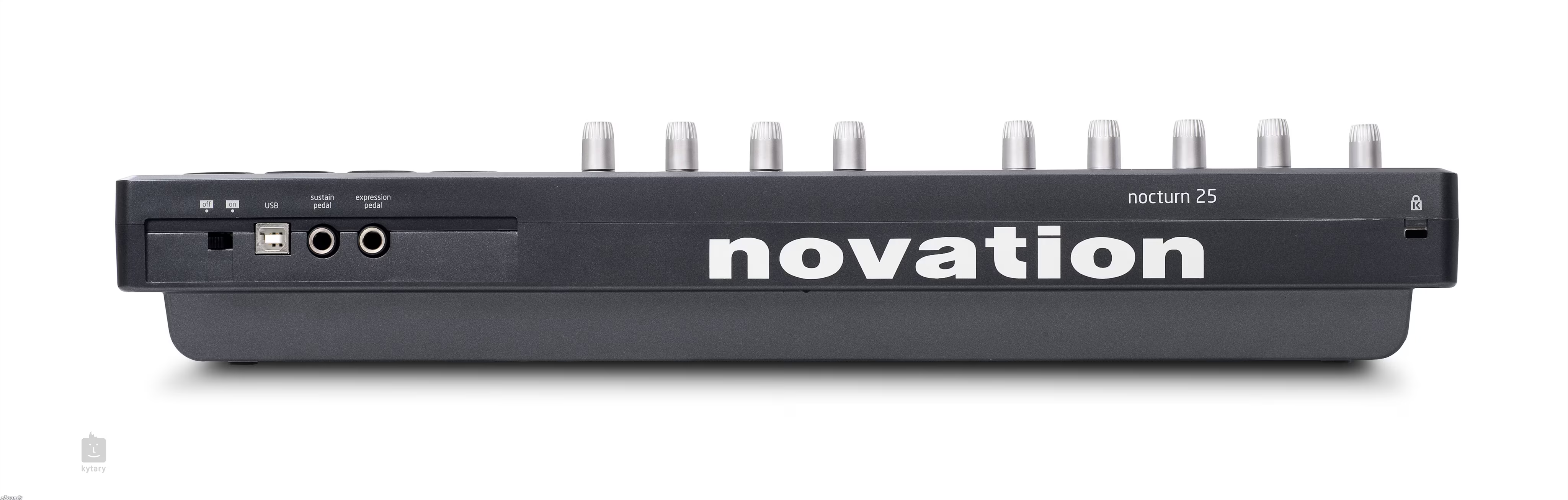
Rear Panel connections are as follows:
• Data Port: 1 x USB (Win XP/Vista and Mac OSX) –Class Compliant
• Sustain Pedal: 1 x 1/4 Jack Input
• Expression pedal: 1 x 1/4 Jack Input
• Power switch: USB
Minimum Operational Requirements:
Mac OSX 10.4.11 or greater (Leopard also supported) or Windows XP with
Service Pack 2 or greater (Vista 32/64 also supported)
Minimum Computer spec: Mac - G4/1GHz, both with 512MB RAM or PC -
Pentium 4/1GHz/512MB RAM (machines running Vista will require a higher spec)
Interfacing:
USB 1.1 and USB 2.0 compatible
Dimensions:
Size (25 key): W=472mm, H=68mm, D=260mm
Size (49 key): W=798mm, H=68mm, D=260mm
Weights:
25 key net weight : 2.4kg
49 key net weight: 3.8kg
Nocturn Keyboard is an intelligent plug-in/sequencer controller. It has a high quality 'Fatar' keyboard, with 8 drum pads and a total of 33 assignable controls, which allow you to get hands-on control of your plug-in instruments, effects and sequencer.
Most keyboard controllers have two big problems: The idea of being able to control software parameters with knobs and buttons sounds great. However, the hassle of assigning them, and remembering what they are assigned to becomes so tedious that you always end up turning back to your mouse.
Nocturn Keyboard's Automap control software solves both these problems. To assign controllers, simply click on the parameter, touch a knob or button, and it is assigned! It also enables you to keep track of what is assigned to what - instead of using a small monochrome LCD screen, Nocturn Keyboard displays control information where you really need it: on your computer monitor. The Automap software graphically displays Nocturn’s control surface. The controllers themselves also tell you what is going on: LED rings around the 8 encoders show their current settings, and LED’s behind the buttons tell you if they are on or off.
Back to top
Automap
Apart from from high quality hardware, what really sets Nocturn Keyboard aside is the Automap control software. Automap is now even more powerful and easy to use. Nocturn Keyboard ships with Automap standard, which acts as a software interface for the unit.
Instant Assignment
Automap enables you to map parameters in your software plug-ins, straight to dials and buttons on the controller by simply clicking on a parameter, then touching the controller. There is no longer any need to sift through long lists of MIDI continuous controller numbers. This applies to encoders, control-buttons, drumpads, modulation wheel, sustain and expression pedals; Automap can instantly assign them all to software parameters. Automap can integrate with Logic, ProTools, Digital Performer and any other HUI compatible sequencers, using the HUI control protocol.
Displaying Control Information
The Automap GUI graphically displays all the controls on Nocturn Keyboard, visually showing you what software parameter is assigned to each control, exactly as it is laid out on the unit. You can also name each control, turning the GUI into a giant screen where all information is instantly displayed and updated. With this, there is no need for a tiny LCD screen on the unit, which can only display very limited information.
Automatic Mapping
Automap will automatically assign knobs and buttons to parameters on a huge number of the most popular plug-ins. We are constantly building more maps which are available on the community pages of the Novation website. Nocturn Keyboard will automatically assign controllers to mixer and transport functions in all major DAWs/sequencers.
Back to top
DAW Control
Nocturn Keyboard can be set up for use as a serious DAW/sequencer controller, as well as its ground-breaking Automap control of all VST/AU/RTAS/TDM plug-ins. See below for details of how Nocturn integrates with major DAWs.
Ableton
Transport Control: Yes
Mixer Control: Yes, using Ableton's 'learn' mode
Further Control: More features can be controlled with Nocturn Keyboard via Ableton's 'learn' mode.
Pro Tools
Transport Control: Yes
Mixer Control: Yes
Further Control: All Pro Tools' RTAS and TDM plug-ins can be instantly controlled with Automap
Record/Reason
Transport Control: Yes
Mixer Control: Yes
Further Control: All native instruments and effects can be instantly controlled with Automap
Logic
Transport Control: Yes
Mixer Control: Yes
Further Control: All native instruments and effects can be instantly controlled with Automap
Doprava zdarma při nákupu nad 2 500 Kč
Vždy vás rádi uvidíme na kterékoliv z našich prodejen, ale je nám jasné, že někdy je rychlejší objednat si zboží rovnou až ke dveřím. Pokud patříte mezi tyto hudbymilovné nedočkavce, určitě oceníte, že všechny objednávky v hodnotě 2 500 Kč a více vám s dopravcem GLS dovezeme zdarma. V případě nadrozměrných zásilek nabízíme dopravu zdarma od hodnoty 23 900 Kč prostřednictvím dopravce DHL.
Nabízíme nejlepší cenu na trhu
Vše se snažíme nabízet za nejnižší cenu na trhu. Našli jste i tak nižší cenu? Ozvěte se prostřednictvím formuláře a my se pokusíme naši cenu ještě snížit. Pokud nižší cenu objevíte až po nákupu u nás, ozvěte se nám do 30 dnů na . Bude-li to možné, kompenzujeme vám rozdíl cen zpětně formou zákaznického bonusu.
Prodloužená záruka na 3 roky
Hudba kultivuje svět kolem nás, a proto se nadstandardními službami snažíme pomáhat hudebníkům v jejich tvorbě. Krom dalších benefitů můžete počítat s prodlouženou zárukou na 3 roky. Spokojenost zákazníka je pro nás vždy na prvním místě.
Možnost vrácení zboží do 30 dnů
Může se stát, že navzdory pečlivému výběru nesplní nástroj vaše očekávání. Chceme, abyste s nástroji od nás byli 100% spokojení, proto vám umožňujeme zboží do 30 dnů od nákupu vrátit. Nezáleží, jestli jste nakupovali na e-shopu nebo v kamenné prodejně. My vám do 14 dnů od přijetí nepoškozeného zboží vrátíme vaše peníze. Více o vrácení zboží
*Prosíme o pochopení, že při nákupu na IČO nejde od smlouvy odstoupit. Přesto nás kontaktujte, pokusíme se vám vyjít maximálně vstříc.
Při vracení zboží hradíme dopravu
Naším cílem je, abyste se mohli maximálně soustředit na sebe a svou hudbu. Pokud se rozhodnete zakoupené zboží vrátit nebo vyměnit, zajistíme vyzvednutí na naše náklady. Jediné, co je potřeba, je kontaktovat naše reklamační oddělení na e-mailu . Tuto službu lze využít 1 za 90 dní. Více o vrácení zboží.
S každým nákupem získate bonus
Každý nákup, který provedete na e-shopu nebo v prodejně Kytary.cz, vám krom velké radosti přinese i zákaznický bonus, který můžete spořit na vašem zákaznickém účtu. Jakoukoliv příští objednávku můžete o tento bonus zlevnit. Více o zákaznickém bonusu.
Možnost vyzkoušet nástroje ve zkušebnách na prodejně v Praze
V pražských Modřanech se nachází naše nejmodernější prodejna, ve které zažijete novou éru výběru hudebních nástrojů. Má pět plně vybavených zkušeben a najdete zde to nejlepší ze současné produkce. Každá sekce hudebních nástrojů má svůj vlastní prostor, ve které si budete připadat jako v hudebním ráji. Cokoliv z největšího skladu v ČR vám připravíme do 10 minut k vyzkoušení. Tento evropský unikát při výběru nástrojů zažijete jen tady. Postarají se o vás naši odborníci z řad hudebníků, se kterými si budete dobře rozumět. Více o naší prodejně v Praze.
Našli jste lepší cenu u konkurence?
Narazili jste na totožné zboží s levnější cenovkou? Uděláme maximum, abychom naši cenu ještě snížili.
Porovnat lze pouze zboží, které nabízí certifikovaný prodejce působící na našem trhu a má toto zboží skladem.
Děkujeme za váš zájem o nákup u nás.
Po přezkoumání konkurenční ceny se vám ozveme zpět s nabídkou lepší ceny.
Prodejna Praha
Prodejna Praha
Nahlášení závadného obsahu
Nahlášení závadného obsahu jsme přijali
Po zpracování vás budeme kontaktovat na uvedeném e-mailu.
Brzy se vám ozveme zpět a společně vyřešíme váš dotaz.
Pojďme se sladit
Cookies jsou drobné soubory, které se při návštěvě webových stránek ukládají pro různé účely do zařízení, ze kterého na naše stránky vstupujete. Pokud soubory cookies povolíte, proběhne vaše návštěva na webu Kytary.cz vždy v dokonalé harmonii s vaším očekáváním.
Tyto soubory cookies jsou pro nás něco, jako jsou pro hudebníky hudební nástroje. Bez nich vám zkrátka nemůžeme pořádně hrát. Abyste mohli využívat kompletní služby našeho webu, musí tyto typy cookies zůstat zapnuté.
Tento typ cookies nám pomáhá sledovat, co se na našich webových stránkách děje, a s jejich pomocí také vyhodnocujeme, jakým způsobem naši zákazníci stránky využívají.
Analytické a funkční cookies mohou sledovat například dobu, kterou na webu jako zákazníci trávíte, nebo další webové stránky, které navštěvujete.
Díky těmto cookies umíme zahrát na notu, která vám zní nejlépe, a případně podle nich můžeme náš web dále ladit tak, abyste byli s jeho funkcemi spokojení.
Informace shromážděné prostřednictvím analytických cookies neidentifikují žádné osoby.
Marketingové cookies používáme proto, aby se vám v prohlížeči zobrazovala reklama, která vás pravděpodobně bude zajímat na základě vašich zvyků při procházení internetového obsahu. Tyto soubory využíváme my nebo poskytovatelé reklam a mohou kombinovat informace shromážděné z našich i jiných webových stránek, které jste dříve navštívili. Pokud se rozhodnete tyto soubory odstranit nebo deaktivovat, může vám nadále zobrazovaná reklama připadat jako dechovka v uších metalisty.
Hurá, teď už nám to jen potvrďte!
Odeslali jsme vám e-mail s odkazem, přes který dokončíte odběr novinek.
Hlídání dostupnosti produktu
Produkt není aktuálně k dispozici. Jakmile bude skladem, zašleme vám upozornění e-mailem.
/
Upozornění o dostupnosti produktu je aktivní
Obdržíte od nás e-mail, jakmile bude produkt skladem. Hlídání dostupnosti bude aktivní do příštího naskladnění.
Hlídání dostupnosti produktu bylo zrušeno
Už vám dále nebudeme zasílat e-maily o naskladnění tohoto produktu.
Hlídání dostupnosti produktu již není možné zrušit
Hlídání bylo automaticky zrušeno po naskladnění produktu nebo odkazem z e-mailu.